



Analyze any app with our ChiliASO MCP server and your AI agent
Ask in plain language for keyword rankings and their history, rating dynamics, reviews and competitor data across the App Store, Google Play, RuStore and AppGallery, for any app. No manual exports, no switching between dashboards.
Where does Duolingo rank for “learn spanish” in the US App Store?


Position 1 every day from 24 Aug to 6 Sep. Search volume sat at 2 040 and fell to 1 855 on 5 Sep.
27 Aug has positions but no volume value. I left it as a gap.
Type the question, skip the export
-
“Where does Duolingo rank for learn spanish in the US App Store, and how did the position move over the last two weeks?”
A position for every date.
-
“Read the latest reviews of my app and tell me what people complain about repeatedly.”
Recurring complaints, with the text behind them.
-
What terms does the store suggest around my keywords?
Suggest terms for each keyword you name.
-
“Which apps sit above mine in the top 10 for my main query?”
The whole top 10, day by day.
Pull six kinds of data into the chat
-
01.
See where you rank
Check where an app ranks for the queries that matter, in any of the four stores, and put competitors next to it.
-
02.
Track what you gained and lost
Ask which keywords you gained, which you lost and which dropped out over a period.
-
03.
Find terms worth tracking
Surface new search terms from the store’s own suggest, built out from your current keyword set.
-
04.
Follow the rating day by day
Read rating dynamics day by day and compare them across countries.
-
05.
Read the reviews
Pull the latest reviews and spot recurring complaints without scrolling hundreds of them.
-
06.
Put any app next to yours
Compare any app in the store against your own: rankings, ratings, reviews. It does not have to be an app you track.
See what the connector reaches
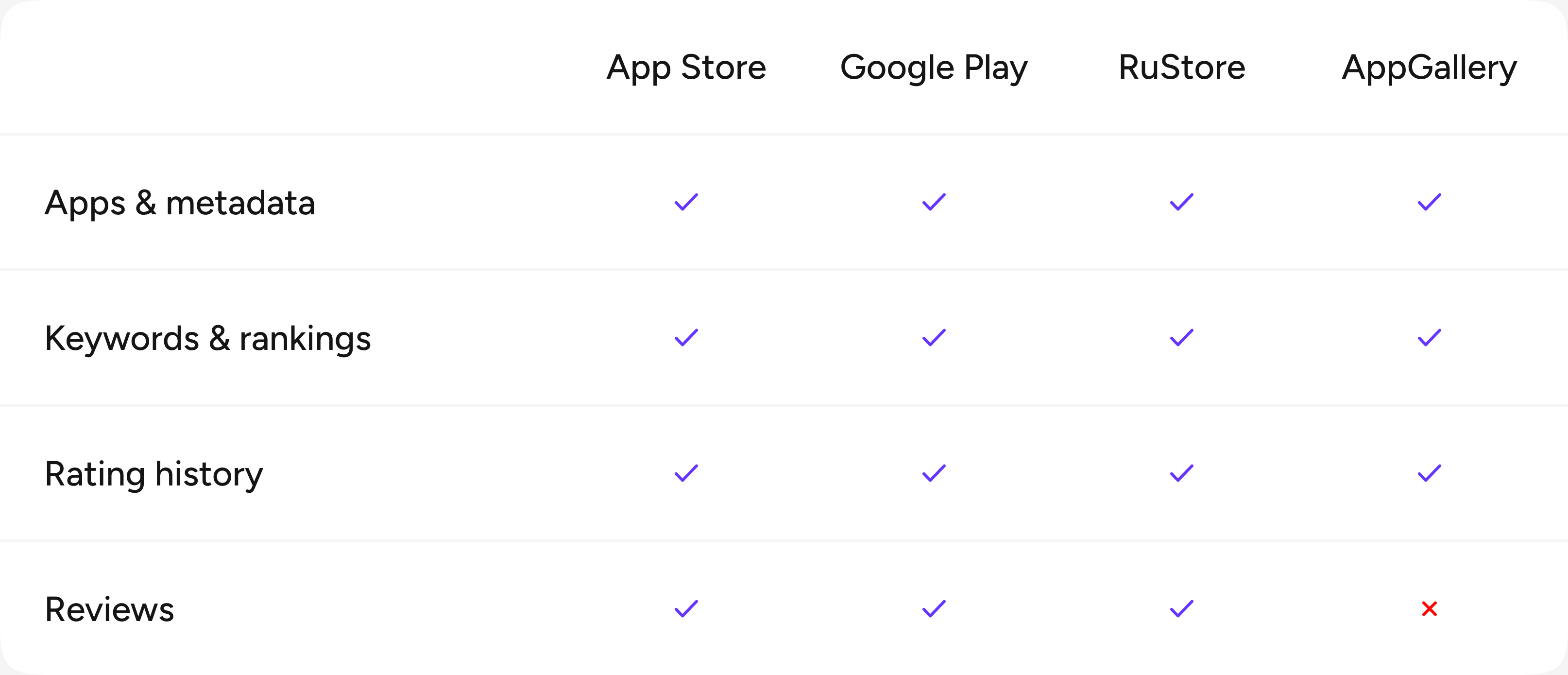
Connect it in four steps
Support for custom MCP servers depends on your client, its version and its plan.
-
01
Find where your client adds servers
In its settings, look for MCP, Connectors, Integrations, Tools or Apps.
-
02
Add the ChiliASO server
Paste the URL:
https://chiliaso.lovemobile.com/
-
03
Sign in to ChiliASO
A browser window opens. Log in and confirm access.
-
04
Go back and ask
Ask about apps, keywords, positions, ratings and reviews in your own words.